Stats and Metrics
Your dashboard shows two sets of metrics: practice-level stats at the top, and call activity metrics below. Here is what each number means.
Practice stats
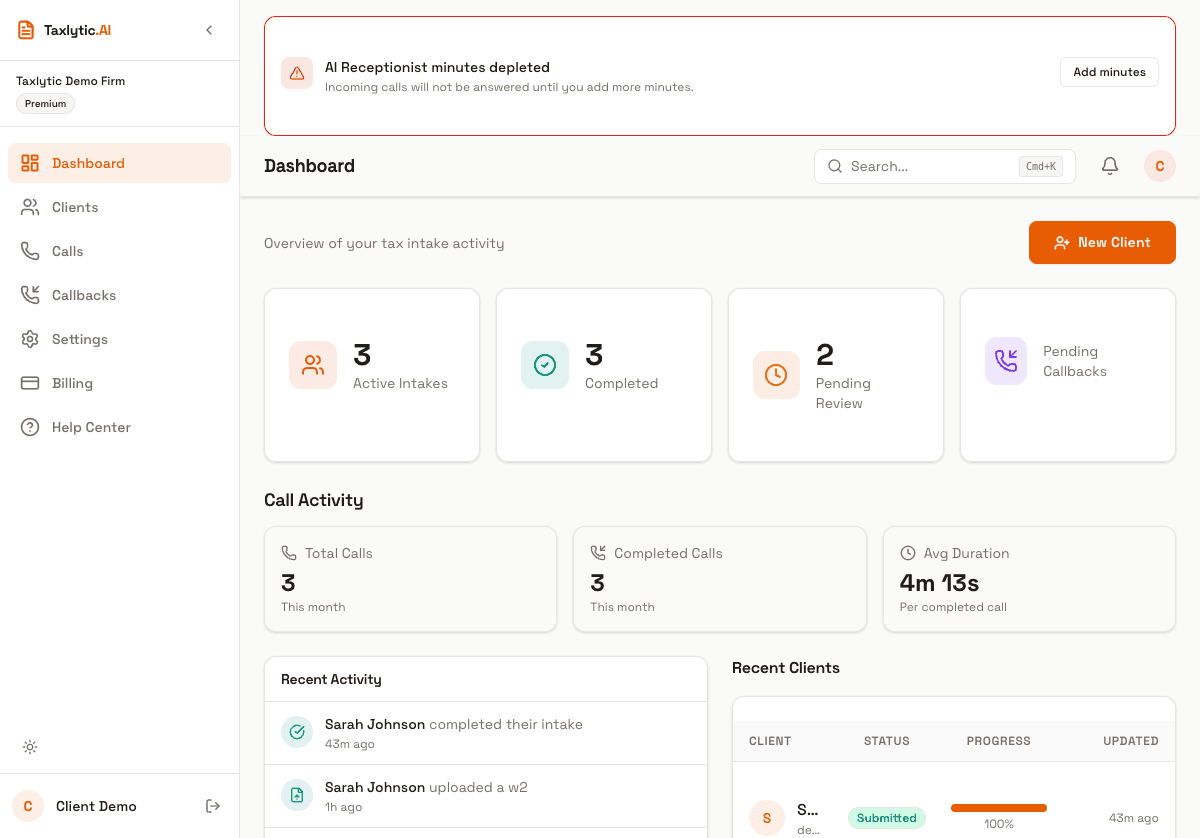
Total Clients
The total number of clients in your account, regardless of their intake status. This includes invited, active, submitted, and reviewed clients.
Active Sessions
Clients who have opened the intake link and are currently in the process of providing their information through the AI chat.
Completed Intakes
Clients who have finished providing all their tax information and submitted their intake for your review. These are ready for you to review and use for tax preparation.
Pending Callbacks
The number of callback requests from the Voice Receptionist that are waiting for you to follow up on. Click the notification icon to go to the Callbacks page.
Call activity metrics
If you have Voice Receptionist enabled, you will also see monthly call statistics:
Total Calls
All inbound calls received by your AI Receptionist this month, including those that were not completed.
Completed Calls
Calls that were answered and had a meaningful conversation. This excludes calls that disconnected immediately or failed.
Avg Duration
The average length of completed calls, displayed in minutes and seconds. This helps you estimate your call minute usage.