Managing Your Subscription
You can manage your subscription from the Billing page in your dashboard. This includes upgrading, downgrading, updating payment methods, and cancelling.
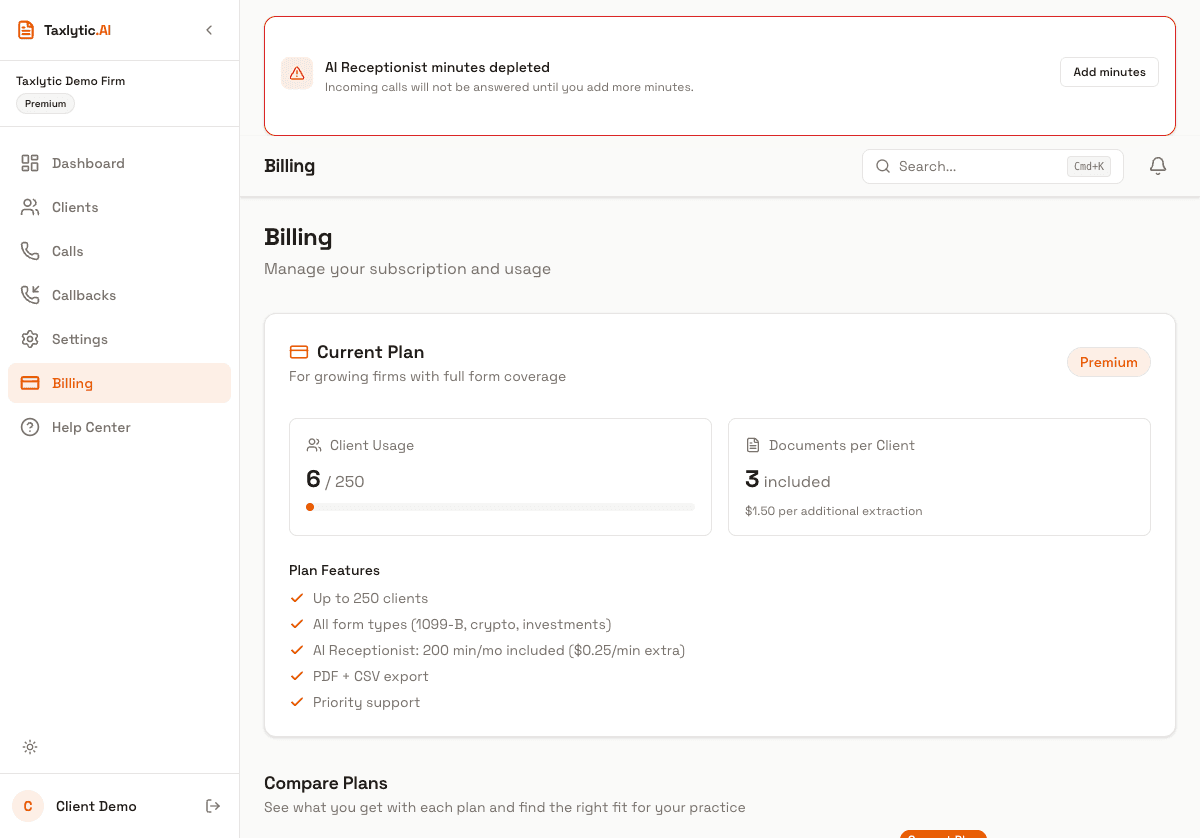
Accessing the Billing page
Click Billing in your dashboard sidebar. You will see your current plan, subscription status, usage stats, and a button to manage your subscription through the Stripe Customer Portal.
Upgrading or downgrading
Click "Manage Subscription" on your Billing page to open the Stripe Customer Portal. From there you can:
- Switch between monthly and annual billing
- Upgrade to a higher plan
- Downgrade to a lower plan
- Update your payment method
- View your invoice history
Note: Plan changes take effect at the start of your next billing period. If you upgrade mid-cycle, you will receive prorated credit for the unused portion of your current plan.
Cancelling your subscription
You can cancel your subscription at any time from the Stripe Customer Portal. When you cancel:
- Your subscription remains active until the end of your current billing period.
- After the billing period ends, you enter a 30-day read-only grace period.
- During the grace period, you can still log in and view your data (export clients, review intake data), but you cannot accept new clients or start new intakes.
- After the 30-day grace period, your account is deactivated.
Warning: During the grace period, your dashboard shows a banner explaining the read-only state. Make sure to export any client data you need before the grace period ends.
Resubscribing
If you change your mind during the grace period, you can resubscribe at any time. Your data will be fully restored and you can resume accepting clients immediately. Visit the Billing page and select a new plan.